Front desk
Sign a consent
Hand a tablet to a patient who just checked in. They read and sign, and it files itself to their chart.
What happens
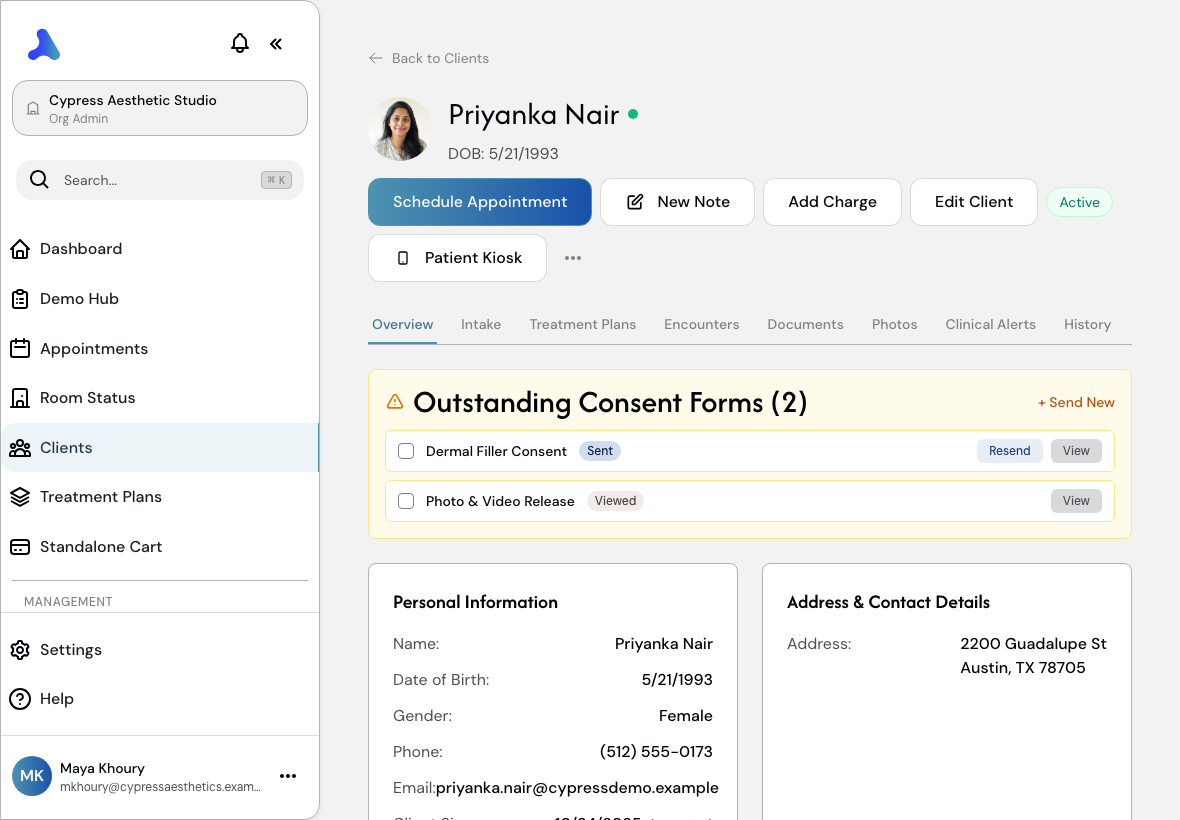
Priyanka has just checked in. Start Patient Kiosk, which locks the tablet to her forms and nothing else, and hand it over. She reads, signs with a finger and submits. Staff unlock the tablet with their PIN, and the signed form is already filed on her chart with a timestamp.
Why it matters
Signed before she sat down, and filed automatically. No clipboard, no scanning.
Step by step
Hand her the tablet
Priyanka just checked in. Patient Kiosk locks the tablet to her forms, and nothing else.
Her forms are waiting
Open Consent Forms.
Review & Sign
Sent with her appointment reminder. She finishes it here, in the waiting room.
She reads, then signs
Tap to sign, sign with a finger, then Use this signature. The page never jumps.
Agree and submit
Tick I agree, then Sign and Submit. No clipboard, no scanning.
Hand it back
Exit Kiosk with the staff PIN, so a patient can never wander into the rest of the app.
Back on her chart
Open Documents.
Filed automatically
Signed, timestamped, and the signed PDF is already on her chart.
Signed before they sit down. Filed automatically.
Built only for aesthetic practices.
All patients, staff and figures shown are fictional demo data.